Top Clickfunnels Integrations To Supercharge Your Marketing Strategy
From Manual Work to Smart Automation
The digital world has changed. It is no longer about who works the hardest, but who builds the smartest systems. For businesses using ClickFunnels, the goal has shifted: it is not enough to just have a great landing page. You need to build a “Wholly Automated Marketing Strategy.”
This means creating a system where everything—finding customers, making sales, shipping products, and keeping customers happy—happens automatically. Once set up, this system can handle one customer or one million customers with almost no extra effort.
Why Automation is Essential
Automation isn’t just about saving time; it is about profitability. The data shows that moving away from manual work is the single best investment you can make:
- Sales Productivity: Up by 14.5%.
- Marketing Overhead: Down by 12.2%.
- Lead Generation: Automated follow-ups can increase qualified leads by 451%.
- Return on Investment: For every £1 spent on automation, businesses see an average return of £5.44.
What This Guide Covers
This report is a blueprint for building that autonomous machine using ClickFunnels. It goes beyond simple feature lists to show you exactly how to connect the pieces.
We will look at how to take ClickFunnels (your “digital storefront”) and connect it deeply with other powerful tools. By using a “middleware” layer (like Make.com) and smart customer management (like ActiveCampaign), you can build a business that doesn’t just wait for you to log in—it runs itself.
The High Cost of Waiting
To understand why connecting your systems is so important, you first have to look at what goes wrong when they aren’t connected.
In manual or semi-automated businesses, the biggest enemy is lag. This is the delay between a customer doing something (like clicking “buy”) and the business actually reacting.
- If a new lead comes in but sits in an inbox for hours, they get cold.
- If a sale happens but the shipping team doesn’t get the data until the end of the day, the customer waits longer.
These delays hurt the customer experience and slow down how fast you get paid.
The Solution: Total Automation
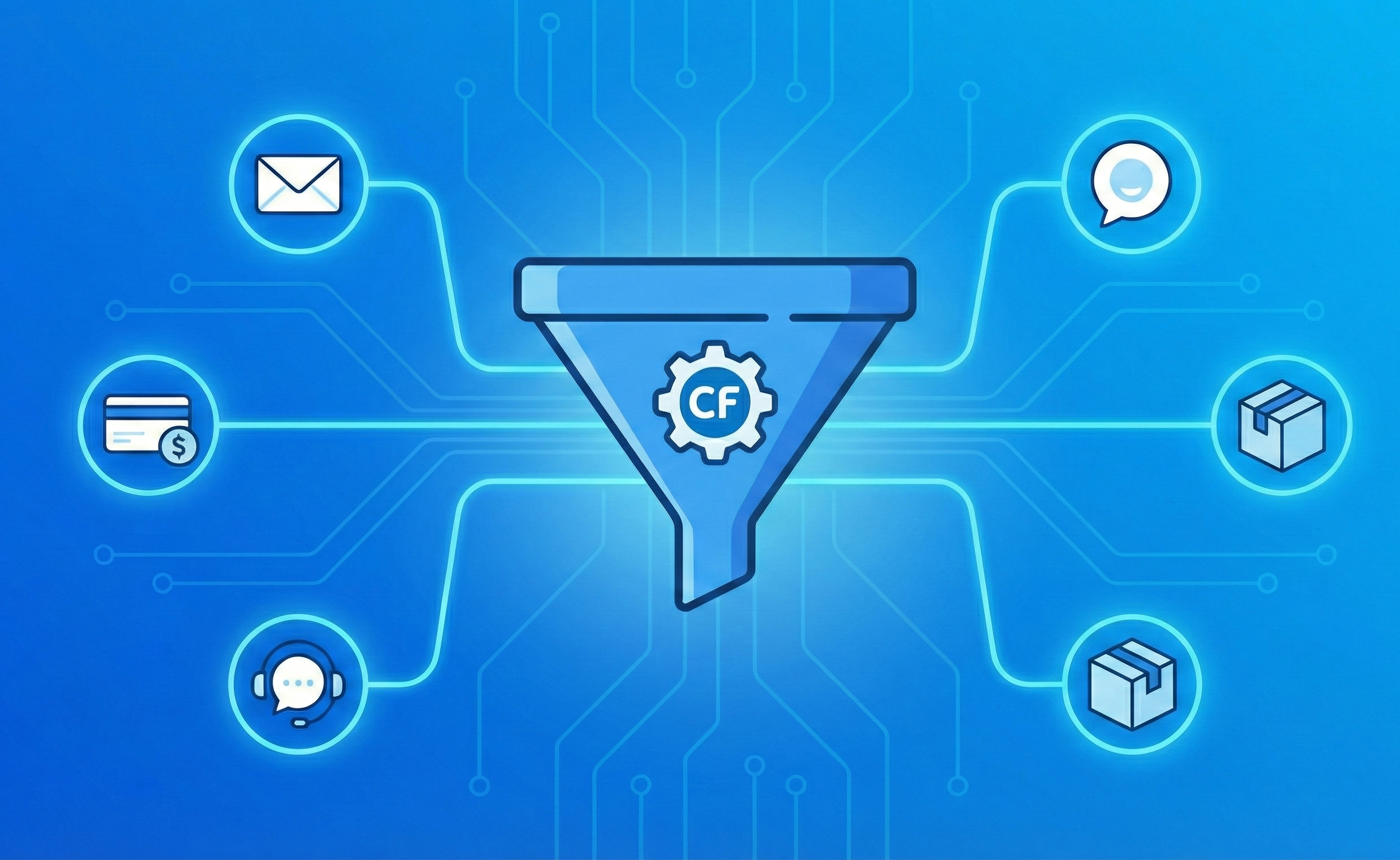
The goal of a “wholly automated” strategy is to remove that lag entirely. The moment a customer interacts with your landing page (e.g., ClickFunnels), a chain reaction should happen instantly:
- Access is granted to the digital product.
- An invoice is sent immediately.
- The CRM is updated with the new customer info.
- Shipping is notified to send physical goods.
- Support tickets are created if needed.
By using tools that let different software “talk” to each other (like APIs), these steps happen automatically in the background. This ensures your business operates at the speed of the internet, rather than the speed of human typing.
ClickFunnels: The Heart of the Operation
In this automated system, ClickFunnels acts as the central hub. Its main job is to handle what the customer sees and experiences. Whether you are using the Classic version or the newer 2.0, the platform is designed to do one thing very well: guide visitors down a simple, direct path to making a purchase.
The Funnel is Not the Business
However, it is important to remember that a funnel is just a way to capture a sale—it is not the entire business.
For a strategy to be truly “wholly automated,” the funnel is just the starting gun. Because no single platform can do everything perfectly, we use a strategy called “Separation of Concerns.” This is a fancy way of saying: “Let the experts handle the details.”
Instead of forcing ClickFunnels to try to do everything, we connect it to specialized tools:
- Email platforms handle communication.
- Logistics software handles shipping.
- Logic tools handle complex data.
By letting each tool do exactly what it was built for, your system becomes more stable, scalable, and powerful.
Choosing Your Foundation: Classic vs. 2.0
The most critical decision you will make is choosing which version of ClickFunnels will serve as the engine of your business. The two versions work very differently, and understanding this difference is key to building the rest of your system.
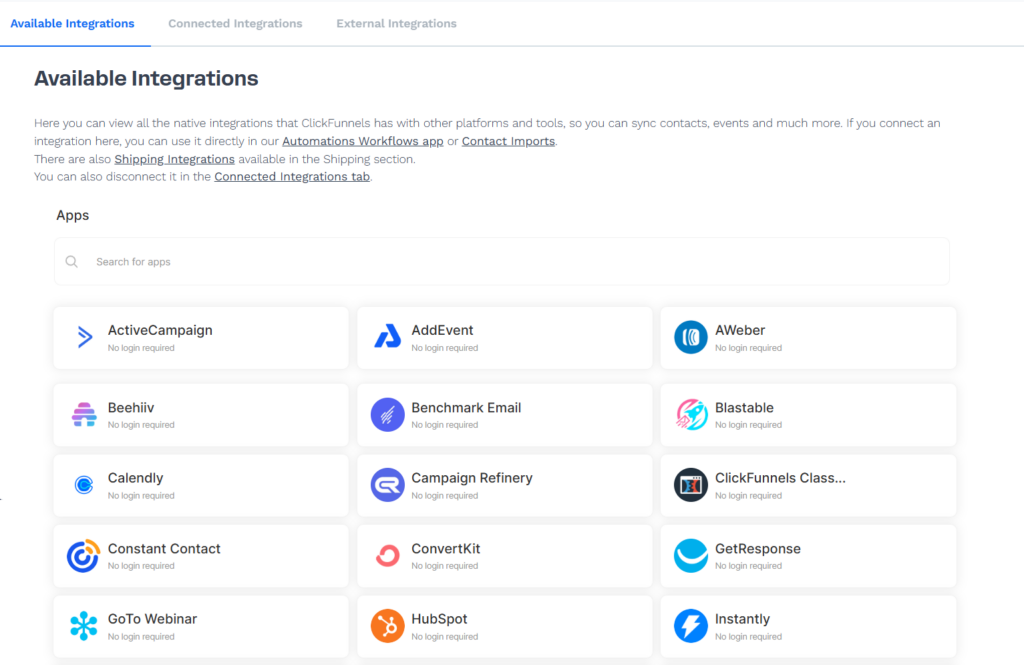
ClickFunnels Classic: The “Connector” Model
Think of ClickFunnels Classic as a specialist. It is excellent at building pages and funnels, but it relies on “friends” to handle everything else.
- How it works: You build the funnel in ClickFunnels, but your emails live in ActiveCampaign, and your complex rules live in Zapier.
- The Benefit: This is actually a safety feature. Because your systems are separate (“decoupled”), if one tool goes down, the others stay up. Your customer data is safe in your CRM even if the funnel software has a hiccup.
- The Downside: To do fancy things—like sending a different email based on where a customer lives—you almost always need a middleman tool like Zapier to bridge the gap.
ClickFunnels 2.0: The “All-In-One” Ecosystem
ClickFunnels 2.0 tries to bring everything under one roof. It introduces “Workflows” (a visual map of what happens after a sale) and its own built-in CRM.
- How it works: Your store, your emails, and your funnel all live in the same “workspace.”
- The Benefit: Speed and simplicity. Because everything is internal, you don’t need to connect different softwares just to unlock a course or send a “Thank You” email. It happens instantly.
- The Downside: While it can do everything, it doesn’t necessarily do everything best.
The Recommendation: The Hybrid Approach
While 2.0 is powerful, the smartest businesses avoid the trap of using it for absolutely everything.
Specialized tools—like Intercom for customer chat or ShipStation for mailing packages—are usually much better than the “built-in” versions of any all-in-one platform.
The Blueprint for Profit: Use ClickFunnels 2.0 for what it does best (immediate sales and simple delivery), but keep using specialized external tools for the heavy lifting (logistics and complex customer support). This gives you the speed of 2.0 with the power of a professional tech stack.
Capability Comparison
| Feature | ClickFunnels Classic | ClickFunnels 2.0 | Strategic Implication for Automation |
| Visual Workflow Builder | No (Basic Lists) | Yes (Flows) | 2.0 allows internal logic; Classic requires Make/Zapier for all logic. |
| Email Marketing | Basic (Follow-up Funnels) | Native (Advanced) | ActiveCampaign is still recommended for advanced “Deep Data” segmentation. |
| CRM Architecture | Basic Contacts | Native CRM | 2.0 acts as a System of Record; Classic acts as a Lead Capture Source. |
| E-commerce Fulfillment | Integration Only | Native + Integration | 2.0 simplifies digital delivery; physical goods still need ShipStation. |
| Webinars | Native (Basic) | Native (Basic) | External tools like EverWebinar are required for “Simulated Live” automation. |
| API/Webhooks | Standard (V1) | Advanced (V2 Endpoints) | 2.0 offers more granular trigger events for complex middleware logic. |
The “Brain” of the Operation: The Middleware Layer
To build a truly automated business, you need more than just direct connections. Simply clicking “Connect Mailchimp” inside ClickFunnels is often too rigid. It’s like connecting two tin cans with a string—it works, but you can’t do much with it.
For a “wholly automated” strategy, you need a central nervous system—a smart layer that sits in the middle and tells your data where to go.
Make.com vs. Zapier
There are two main tools for this: Zapier and Make.com (formerly Integromat).
- Zapier is great for simple, straight-line tasks (If X happens, do Y).
- Make.com is the choice for serious, profitable automation. It allows for complex logic, meaning it can “think” and make decisions based on the data it receives.
The Power of “Routers” (Doing 4 Things at Once)
The biggest advantage of Make.com is the Router. In a basic setup, a sale creates one action. But with a Router, a single sale in ClickFunnels can trigger multiple parallel paths instantly:
- Path A (Shipping): Checks if the product is physical. If yes, it tells the warehouse to ship it.
- Path B (CRM): Updates your email list, tagging them as a “Customer” so they stop getting sales emails.
- Path C (Finance): Sends the transaction data to your accounting software automatically.
- Path D (VIP Alert): Checks the price. If they spent over $500, it alerts your sales team on Slack to call them personally.
Filters: The Gatekeepers
You can also set up Filters to act as security guards. They stop errors before they happen.
- Example: You want to send an SMS welcome message.
- The Logic: The filter checks: “Does this customer actually have a valid mobile number?”
- The Result: If yes, send the text. If not, skip it. This saves you money on failed messages and prevents system errors.
The Safety Net (Error Handling)
Finally, this layer protects your revenue. In the technical world, things break—internet connections drop, servers crash. Make.com has a “safety net” built in. If one step fails (e.g., your email software is down), it doesn’t just crash and lose the customer data. It pauses, holds the data safely, and tries again later. This ensures you never lose a sale just because of a technical glitch.
Zapier: The “Digital Glue”
You can think of Zapier as a universal translator or “digital glue.” It connects apps that wouldn’t normally talk to each other—like connecting ClickFunnels to a Google Sheet.
How it Works: The “Zap”
Zapier operates on a very simple principle called “If This, Then That.” You set up a recipe (called a “Zap”) that consists of two parts:
- The Trigger: This is the starting gun. Example: A new order comes in on ClickFunnels.
- The Action: This is what you want to happen automatically. Example: Send a generic “Thank You” SMS.
Why Use It?
Zapier is famous because it is incredibly easy to use. You don’t need to know how to code; you just pick your apps from a huge library and click “Connect.”
The Downside
While Zapier is great for simple, straight lines (A -> B), it can get expensive if you have thousands of customers. It also struggles with the complex “decision-making” logic (the “Routes” we discussed earlier) compared to Make.com.
The Secret to Speed: Webhooks
To make your business run instantly, you need to understand one slightly technical concept: Webhooks.
The Old Way: “Polling” (Checking the Mail)
Many older systems work by “polling.” This is like walking to your physical mailbox every 15 minutes to see if you have mail.
- If a customer buys something at 2:00 PM, but your system doesn’t check until 2:15 PM, that customer is left waiting.
- In the digital world, a 15-minute delay kills conversion rates.
The New Way: Webhooks (Instant Notification)
Webhooks allow you to stop checking the mailbox. Instead, it’s like having a butler who runs to find you the exact second a letter arrives.
- How it works: ClickFunnels “pushes” the data out instantly.
- The “Payload”: This is just a fancy word for the package of information ClickFunnels sends. It contains the “Who, What, and How Much” of the sale (Customer Name, Order Value, Product ID).
- The Result: Your automation tools (Zapier or Make) catch this package instantly and get to work immediately. No waiting, no lag.
The Intelligent Layer: AI as Your “Gatekeeper”
Finding new customers usually takes a lot of work. The goal of automation here is simple: Stop wasting your sales team’s time on leads who aren’t ready to buy.
By connecting Artificial Intelligence (like OpenAI) to your system, you can create a “Virtual Sales Director” that works 24/7.
How the “Smart Sort” Works:
- The Application: A potential client fills out a form on your ClickFunnels page.
- The Background Check: The system instantly looks up their email to find public info (company size, job role).
- The AI Decision: The AI reads their answers and compares them to your “Perfect Customer.” It then gives them a score (0-100).
- The Routing:
- High Score (The VIP): The system alerts your sales team on Slack immediately (“Call this person now!”) and marks them as a VIP.
- Low Score: The system sends them a helpful email with a lower-priced offer, skipping the phone call entirely.
The Result: Your salespeople only talk to people who are ready to spend money.
Example: The “Evergreen” Webinar: The 24/7 Salesman
Live webinars sell well, but you can’t be live on camera 24 hours a day. An “Evergreen” strategy uses tools (like EverWebinar) to simulate a live event that runs automatically.
The Strategy: When a customer signs up, the system offers them a start time in “15 minutes,” creating urgency. But the real magic happens after the webinar, based on exactly what the viewer did:
- The “No-Show”: If they signed up but didn’t come, the system automatically emails them a replay link.
- The “Leaver”: If they watched half and left, the system emails them: “Hey, did you miss the best part?”
- The “Window Shopper”: If they stayed to the end but didn’t buy, the system puts them in a high-urgency email sequence (“Offer closes soon!”).
Example: Beyond Email: Texting (SMS) and Chat
People don’t always check their email, but they almost always check their texts. A fully automated business doesn’t just email; it texts.
- Instant Contact: When a lead signs up, they get a text immediately.
- AI Responses: If the customer replies to the text, an AI bot can answer simple questions or book an appointment for you.
- Automatic Safety: If a customer replies “STOP,” the system automatically removes them from the list. This keeps you legally compliant without you having to manually update spreadsheets.
The Transactional Layer: Managing the Money
Handling the actual money is the most critical part of the business. Automation here doesn’t just save time; it directly increases your “Lifetime Value” (how much each customer is worth to you).
1. Smart Payments & The “One-Click” Upsell
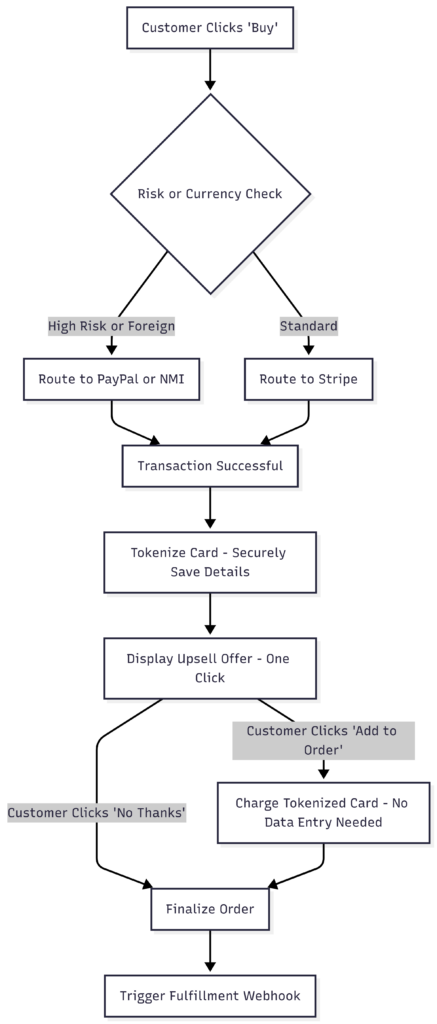
ClickFunnels connects with major payment processors like Stripe and PayPal. But the real profit comes from two advanced strategies:
- Smart Routing: You can set the system to send payments to different accounts based on the currency or product. This lowers your fees and keeps your business safer from bank freezes.
- The “One-Click” Upsell: This is the secret weapon. Once a customer enters their credit card for the first product, the system securely remembers it.
- The Result: You can offer them a second product immediately. They don’t have to type their numbers again—they just click one button.
- The Payoff: This simple trick typically increases average order value by 30-50% instantly.
2. The “Profit Saver” (Automated Dunning)
The biggest hidden cost in subscription businesses is “Involuntary Churn.” This is when a customer wants to stay, but their credit card fails (expired, over limit, etc.).
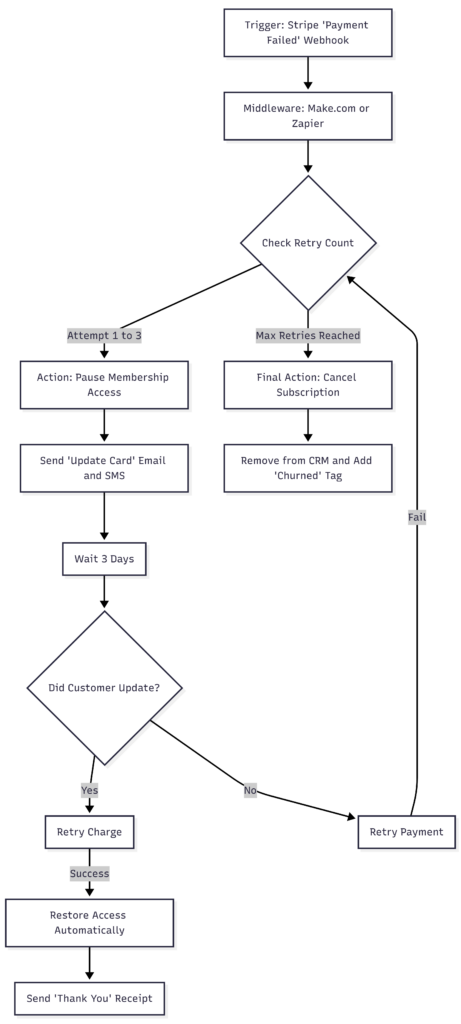
If you try to fix this manually, you will lose money. Instead, we use Automated Dunning:
- The Trigger: A payment fails.
- The Immediate Action: The system automatically pauses their account and sends a polite email and text: “Please update your card to keep access.”
- The Recovery: As soon as the customer updates their card, the system charges them, restores their access, and sends a receipt.
Impact: This automated “collections agent” can recover 20-40% of payments that would otherwise be lost forever.
3. Self-Service Refunds
Processing refunds manually is a waste of staff time and can annoy customers if it takes too long.
The Automated Workflow: You can build a “Self-Service” form. When a customer asks for a refund:
- The system checks the date (e.g., “Is this within the 30-day guarantee?”).
- If yes: It automatically refunds the money, turns off their access to the course/product, and sends a confirmation email.
This happens instantly, building trust with the customer and saving your support team from data entry.
The Fulfillment Layer: Delivering the Goods
Once the sale is made, the clock starts ticking. If delivery is slow or clumsy, customers get “buyer’s remorse.” Automation ensures that whether you are shipping a box or a login code, it happens instantly and without errors.
1. Physical Products: The Automated Warehouse
If you sell physical goods, you need a seamless link between your sales page and your warehouse. We use industry-standard tools like ShipStation to make this happen.
The “Hands-Free” Shipping Loop:
- The Sale: A customer buys a product on ClickFunnels.
- The Handoff: The system instantly tells ShipStation, “New order! Here is the address.”
- The Label: ShipStation creates the shipping label and tells your warehouse to pack it.
- The Loop Closure: The moment the box is scanned onto the truck, the system sends the tracking number back to the customer automatically.
Inventory Guardrails: Advanced automation can also watch your stock levels. If you run out of a product, the system can automatically switch your ClickFunnels page to “Sold Out” or “Pre-Order” so you never accidentally sell stock you don’t have.
2. Digital Products: Instant Access
For courses and memberships, speed is everything.
- Built-in: If you use ClickFunnels 2.0, this is native. The customer buys, and the system instantly emails them their login link.
- External: If you prefer using an outside platform like Teachable or Kajabi, we use a bridge (middleware) to connect them.
The Result: The customer gets access the second their payment clears, reducing support tickets asking, “Where is my password?”
3. “Automated Generosity” (The VIP Touch)
To really stand out, you can use automation to do things that feel high-touch and personal. Tools like ZenDirect allow you to send physical gifts using digital triggers.
How it works:
- The Trigger: A customer spends over $500 (becoming a “VIP”).
- The Action: Your system tells a printing house to mail a physical “Thank You” card (or even a gift like a brownie box) to their house.
This happens automatically in the background, but to the customer, it looks like you took the time to send them a personal gift. This creates a “wow” moment that builds massive loyalty.
The Retention Layer: Keeping Customers for Life
Getting a customer is hard; keeping them is where the real money is. This is the job of your CRM (Customer Relationship Management) system.
While ClickFunnels 2.0 has its own built-in CRM (which is great for simplicity), serious businesses often use a specialized tool like ActiveCampaign.
Why ActiveCampaign? (The “Deep Data” Engine)
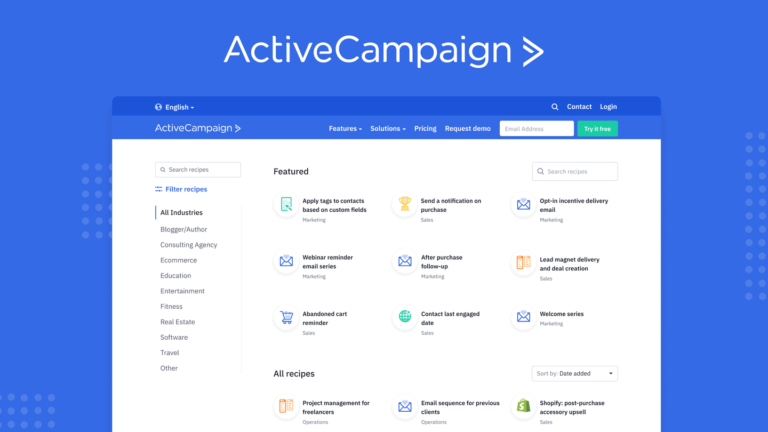
Think of ActiveCampaign not just as an email list, but as a digital detective. It doesn’t just remember your customer’s name; it remembers everything they do.
1. It Knows What You Spent (Deep Data) ActiveCampaign connects directly to the financial side of your business. It knows that “John Smith” didn’t just sign up; he spent exactly $497 on your course last Tuesday. This allows you to treat high-spenders differently than window shoppers.
2. It Watches Your Website (Behavioral Tracking) This is the “magic” feature. ActiveCampaign puts a tiny invisible tracker on your website.
- The Scenario: A past customer silently visits your “High-Ticket Coaching” pricing page 3 times in one week but doesn’t buy.
- The Action: ActiveCampaign notices this behavior. It adds points to their “Lead Score.” Once that score hits a certain number, it automatically sends them an email: “Hey John, saw you were checking out the coaching program. Do you have any questions?”
- The Result: You catch the lead exactly when they are most interested.
How ActiveCampaign & ClickFunnels Work Together
Integrating these two tools creates a powerful loop. Here is how the connection works in plain English:
The Setup: You connect the two platforms using an “API Key” (a secret password that lets them talk). Once connected, they share data instantly.
The Workflow:
- The Trigger: A customer enters their email on a ClickFunnels page to download a free guide.
- The Handoff: ClickFunnels instantly sends that email to ActiveCampaign.
- The Tagging: ClickFunnels tells ActiveCampaign to apply a digital sticky note (a “Tag”) to that person, such as “Lead – Downloaded Guide.”
- The Automation: Inside ActiveCampaign, that Tag acts as a starting gun. It automatically starts an email sequence designed specifically for people who downloaded that guide.
The “Don’t Put All Your Eggs in One Basket” Rule
There is also a safety argument for keeping your CRM separate from your funnel builder.
- Security: If you ever decide to leave ClickFunnels, or if your account there has a technical issue, your list of customers (your most valuable asset) is safe and secure in a totally different building (ActiveCampaign).
- Deliverability: Specialized tools like ActiveCampaign are experts at one thing: getting emails into inboxes and out of spam folders. They often do this better than “all-in-one” tools.
The Support Layer: Keeping Customers Happy (Without Burnout)
Customer support is often where profit goes to die. If you have to pay a human to answer the same simple question 50 times a day, you are losing money.
The goal here isn’t to remove humans entirely, but to create a “filter” so your team only deals with the important stuff.
1. The First Line of Defense: Smart AI Chatbots
Old-school chatbots were annoying—they just gave you a list of buttons to click. Modern AI agents (like Intercom Fin) are different. They are smart enough to read your entire “Help Center” and memorize it.
- How it works: When a customer asks, “How do I return this?” or “Where is my login?”, the AI finds the answer and types it out like a person, instantly.
- The “Frustration Detector”: These bots are smart enough to know when they are out of their depth. If the customer uses angry language or asks a really complex question, the bot immediately stops and says, “Let me get a human for you.”
- The 24/7 Sales Rep: You can also put these bots on your sales page. If a customer is looking at your product at 2:00 AM and asks, “Does this work on Mac?”, the bot answers “Yes” immediately, saving the sale that would have otherwise been lost.
2. The Expansion: “Supercharging” Your Human Team
Even when a human has to be involved, we can use automation to make that human 10x faster. This is done using AI Copilots and Unified Inboxes (using tools like Help Scout, Zendesk, or Gorgias).
A. The “Unified Inbox” (Stop Tab-Switching) In a manual business, support staff have to check Facebook Messenger, Instagram DMs, support emails, and live chat separately. This is slow.
- The Automated Way: All these channels feed into one single screen. A human agent can answer an Instagram DM and an email without ever switching tabs.
B. The AI Copilot (Drafting Responses) This is the biggest breakthrough for manned support.
- The Workflow: A customer emails with a complex problem.
- The AI Assist: Before your support agent even opens the email, the AI reads it and writes a draft response for them.
- The Human Touch: The agent doesn’t have to type the whole email from scratch. They simply read the AI’s draft, tweak a sentence to make it sound friendly, and hit “Send.”
The Result: A human agent who used to handle 10 tickets an hour can now handle 50, because the “heavy lifting” of writing is done by the AI.
The “Wholly Automated” Customer Service Vision
By implementing this architecture, you are not just “using ClickFunnels”; you are building a self-sustaining ecosystem.
- ClickFunnels is the engine that drives sales.
- Make.com is the nervous system that moves data.
- ActiveCampaign is the brain that remembers customer history.
- AI Support is the shield that protects your time.
This transition from “manual labor” to “digital orchestration” is what separates struggling businesses from scalable enterprises.
The Payoff: Why This Strategy Wins
Implementing this automated architecture isn’t just a technical upgrade; it completely changes the economics of your business.
1. Smarter Advertising (The Feedback Loop)
Manual businesses guess which ads work. Automated businesses know.
- Tracking the Source: By using hidden tracking codes (UTMs) on your forms, the system tells your CRM exactly where every customer came from—down to the specific ad they clicked. You will know exactly which $5 ad resulted in a $5,000 customer.
- Training the Robots: This is the most powerful part. When a sale happens in ClickFunnels, your automation instantly pings Facebook or Google and says, “This person just bought!”
- The Result: The ad platforms use this data to find more people just like that buyer. This creates a cycle where your ads get smarter and cheaper over time automatically.
2. The “Speed to Lead” Advantage
The research is clear: speed is everything.
- The Stat: If you call a new lead within 5 minutes, you are 9x more likely to convert them than if you wait 30 minutes.
- The Problem: Humans are slow. We take breaks, we sleep, we get distracted.
- The Solution: This automated system ensures the response happens in seconds, not hours. You capture that 9x advantage on every single lead, 24/7, without lifting a finger.
3. Power to the Marketer (No Coding Required)
Historically, building a system this complicated required a team of expensive software engineers.
- The Shift: Tools like Make.com have democratized this power. Now, a savvy marketing strategist can build these “digital bridges” without writing a single line of code.
- The Benefit: This means your business moves faster. You don’t have to wait weeks for IT to build a feature; your marketing team can build, test, and launch new automations in an afternoon.
Conclusion: Building the Machine
Creating a wholly automated marketing strategy with ClickFunnels is about more than just connecting a few tools; it is about building a business that runs itself.
By using ClickFunnels as your “storefront” and connecting it to a powerful “brain” like Make.com, you move beyond the limits of manual work. You stop trading time for money and start building a system that works 24/7.
The “Maximum Profitability” Stack To achieve this, successful businesses typically use this specific combination of tools:
- Frontend: ClickFunnels 2.0 (The Sales Pages & Cart)
- Middleware: Make.com (The “Brain” that handles logic and routing)
- CRM: ActiveCampaign (The “Memory” that manages customer history)
- Payment: Stripe (The “Wallet” that collects money & recovers failed payments)
- Retention: EverWebinar & ZenDirect (The “Voice” & “Personal Touch”)
- Support: Intercom (The “Assistant” that answers questions instantly)
This setup ensures that every single interaction—from the very first click to the thousandth dollar spent—is handled instantly and perfectly. It transforms your business from a stressful, labor-intensive job into a scalable asset. This frees you and your team to focus on the one thing machines can’t do: innovate.
Final Summary: The “Wholly Automated” Business
By moving from manual work to this digital architecture, you create a business that is:
- Faster: Operating at the speed of the internet.
- Smarter: Using data to automatically train your ads to find better customers.
- Leaner: Drastically reducing overhead costs while increasing sales output.
Works cited
- 70 Marketing Automation Statistics Every Marketer Must Know in 2025 – inBeat Agency, accessed December 12, 2025, https://inbeat.agency/blog/marketing-automation-statistics
- Marketing Automation in 2025: 30 Stats and Insights That Drive ROI – Thunderbit, accessed December 12, 2025, https://thunderbit.com/blog/marketing-automation-statistics
- Top 30 Marketing Automation Statistics For 2025: ROI, Trends & More – Digital Silk, accessed December 12, 2025, https://www.digitalsilk.com/digital-trends/marketing-automation-statistics/
- 5 ways to automate ClickFunnels – Zapier, accessed December 12, 2025, https://zapier.com/blog/automate-clickfunnels/
- ClickFunnels™ – Marketing Funnels Made Easy, accessed December 12, 2025, https://www.clickfunnels.com/
- The Many Benefits Of ClickFunnels In 2025, accessed December 12, 2025, https://www.clickfunnels.com/blog/benefits-of-clickfunnels/
- ClickFunnels Integrations & App Library, accessed December 12, 2025, https://www.clickfunnels.com/integrations
- ClickFunnels Integrations Transform Online Marketing, accessed December 12, 2025, https://www.clickfunnels.com/blog/clickfunnels-integrations-guide/
- ClickFunnels Classic Integrations | Connect Your Apps with Zapier, accessed December 12, 2025, https://zapier.com/apps/clickfunnels-classic/integrations
- Marketing Funnel Automation – ClickFunnels, accessed December 12, 2025, https://www.clickfunnels.com/apps/automations
- ClickFunnels vs ActiveCampaign ( Which Should You Use?) – Numerous.ai, accessed December 12, 2025, https://numerous.ai/blog/clickfunnels-vs-activecampaign
- ClickFunnels Vs. ActiveCampaign: Definitive Comparison, accessed December 12, 2025, https://www.clickfunnels.com/blog/clickfunnels-vs-activecampaign/
- ClickFunnels Webhooks Integration – Cometly Help Center, accessed December 12, 2025, https://help.cometly.com/en/articles/11037774-clickfunnels-webhooks-integration
- How to Create & Manage Webhooks in ClickFunnels, accessed December 12, 2025, https://support.myclickfunnels.com/docs/creating-webhooks-in-clickfunnels
- ClickFunnels Classic and Wix Integration | Workflow Automation | Make, accessed December 12, 2025, https://www.make.com/en/integrations/click-funnels/wix
- ClickFunnels Classic Integration | Workflow Automation – Make, accessed December 12, 2025, https://www.make.com/en/integrations/click-funnels
- How to Use Routers and Filters in Make.com – YouTube, accessed December 12, 2025, https://www.youtube.com/watch?v=viibNraNxHg
- Automate Lead Qualification with AI | Make.com Tutorial for CRM & Slack – YouTube, accessed December 12, 2025, https://www.youtube.com/watch?v=9QtFwPSLxbw
- Get started – Help Center – AWS, accessed December 12, 2025, https://archbee-doc-uploads.s3.amazonaws.com/export/pdf-space/Help%20Center-20250513-1054.pdf
- Make—Filtering Data in Workflows – YouTube, accessed December 12, 2025, https://www.youtube.com/watch?v=55B7u5fXd6o
- Final review: which is the most suitable automation tool for you… Zapier? Make? n8n? Pluga? – Reddit, accessed December 12, 2025, https://www.reddit.com/r/automation/comments/1ex3m8n/final_review_which_is_the_most_suitable/
- Webhooks in ClickFunnels, accessed December 12, 2025, https://support.clickfunnels.com/support/solutions/articles/150000153004-webhooks-in-clickfunnels
- Filtering by page – ClickFunnels 2.0, accessed December 12, 2025, https://developers.myclickfunnels.com/docs/filtering-by-page
- ClickFunnels 2.0 Integration | Workflow Automation – Make, accessed December 12, 2025, https://www.make.com/en/integrations/click-funnels-2
- Make AI Agent Use Case – Automating Lead Qualification – YouTube, accessed December 12, 2025, https://www.youtube.com/watch?v=ng8P2sLN4Bg&vl=en
- how I qualify leads with this AI in 27 Seconds (Make.com + Airtable) – YouTube, accessed December 12, 2025, https://www.youtube.com/watch?v=vi8O1MFNGAE
- Build a High-Converting ClickFunnels Automated Webinar Funnel, accessed December 12, 2025, https://easywebinar.com/automated-webinars-made-simple:-how-to-build-a-high-converting-clickfunnels-automated-webinar-funnel/
- Best Evergreen Webinar Platforms in 2025: Tools to Educate & Sell Better, accessed December 12, 2025, https://webinarninja.com/blog/best-evergreen-webinar-platforms/
- Build an AutoWebinar Funnel – ClickFunnels Support, accessed December 12, 2025, https://support.clickfunnels.com/support/solutions/articles/150000152719-build-an-autowebinar-funnel
- EverWebinar Integration – ClickFunnels Support, accessed December 12, 2025, https://support.clickfunnels.com/support/solutions/articles/150000152704-everwebinar-integration
- EverWebinar – Automated Webinars That Scale, accessed December 12, 2025, https://www.everwebinar.com/
- Add SMS Messages To Your Funnel – ClickFunnels Support, accessed December 12, 2025, https://support.clickfunnels.com/support/solutions/articles/150000152763-add-sms-messages-to-your-funnel
- How to Add LeadTruffle’s Texting Widget to ClickFunnels in 3 Minutes (No Tech Skills Needed), accessed December 12, 2025, https://www.leadtruffle.co/blog/how-to-add-leadtruffles-texting-widget-to-clickfunnels-in-3-minutes-no-tech-skills-needed/
- Using Stripe with Payments AI – ClickFunnels Help Center, accessed December 12, 2025, https://support.myclickfunnels.com/docs/using-stripe-with-payments-ai
- Accepting Payments – Introduction to Payments AI – ClickFunnels Help Center, accessed December 12, 2025, https://support.myclickfunnels.com/docs/accepting-payments-introduction-to-payments-ai
- How to Add a One-Click Upsell Using a Button in Clickfunnels – YouTube, accessed December 12, 2025, https://www.youtube.com/watch?v=ohAEK_aL-CE
- Add an Upsell or Downsell Step – ClickFunnels Support, accessed December 12, 2025, https://support.clickfunnels.com/support/solutions/articles/150000152901-add-an-upsell-or-downsell-step
- Dunning management procedures | Stripe, accessed December 12, 2025, https://stripe.com/resources/more/dunning-management-101-why-it-matters-and-key-tactics-for-businesses
- What is dunning? A guide to dunning emails & reducing churn | Postmark, accessed December 12, 2025, https://postmarkapp.com/guides/dunning
- Automate dunning to reduce churn and boost revenue in your subscription business, accessed December 12, 2025, https://myfundbox.com/post/automate-dunning-to-reduce-churn-and-boost-revenue-in-your-subscription-business
- Stripe: Refund Follow-up | ActiveCampaign, accessed December 12, 2025, https://www.activecampaign.com/recipes/stripe-refund-follow-up
- Can I issue a refund inside of ClickFunnels using my payment gateway?, accessed December 12, 2025, https://support.clickfunnels.com/support/solutions/articles/150000153053-can-i-issue-a-refund-inside-of-clickfunnels-using-my-payment-gateway-
- How to Create a Storefront Funnel – ClickFunnels Help Center, accessed December 12, 2025, https://support.myclickfunnels.com/docs/how-to-create-a-storefront-funnel
- Shipping Overview in ClickFunnels, accessed December 12, 2025, https://support.myclickfunnels.com/docs/shipping-shipping-overview
- ClickFunnels 2.0 Review (2026) | Is It Now A Sales Funnel + Online Course Platform?, accessed December 12, 2025, https://www.learningrevolution.net/clickfunnels-review/
- ClickFunnels Now Integrates With ZenDirect, accessed December 12, 2025, https://www.clickfunnels.com/blog/clickfunnels-integrates-zendirect/
- ClickFunnels vs. ActiveCampaign: Which is best? [2025] – Zapier, accessed December 12, 2025, https://zapier.com/blog/clickfunnels-vs-activecampaign/
- ActiveCampaign vs ClickFunnels (Comparison) – Forbes Advisor, accessed December 12, 2025, https://www.forbes.com/advisor/business/software/activecampaign-vs-clickfunnels/
- Support Automation: Benefits, Examples, and How to Implement – Intercom, accessed December 12, 2025, https://www.intercom.com/learning-center/support-automation
- How To Use AI Marketing Software To Transform Your Business – ClickFunnels, accessed December 12, 2025, https://www.clickfunnels.com/blog/ai-marketing-software/
- 10 Best AI Chatbots for Customer Service in 2025 [Manually Picked] – Azumo, accessed December 12, 2025, https://azumo.com/guides/best-ai-chatbots-for-customer-service
- AI in the DMs: Using AI to Qualify Leads in Chat – GoHighLevel, accessed December 12, 2025, https://www.gohighlevel.com/post/ai-in-dms-qualify-leads-in-chat
- Filtering Funnel Stats – ClickFunnels Support, accessed December 12, 2025, https://support.clickfunnels.com/support/solutions/articles/150000152747-filtering-funnel-stats
- Guide: Automation for each stage of your lead lifecycle | Zapier, accessed December 12, 2025, https://zapier.com/resources/guides/automation-lead-lifecycle-stages
- Clickfunnels And Lead Generation: Set Up & Quick Notes | SalesHive Blog, accessed December 12, 2025, https://saleshive.com/blog/clickfunnels-and-lead-generation-set-up-quick-notes/